Function Skatepark
Build a skate park out of polynomials, then ride it.
Play now Web Touch
How to play
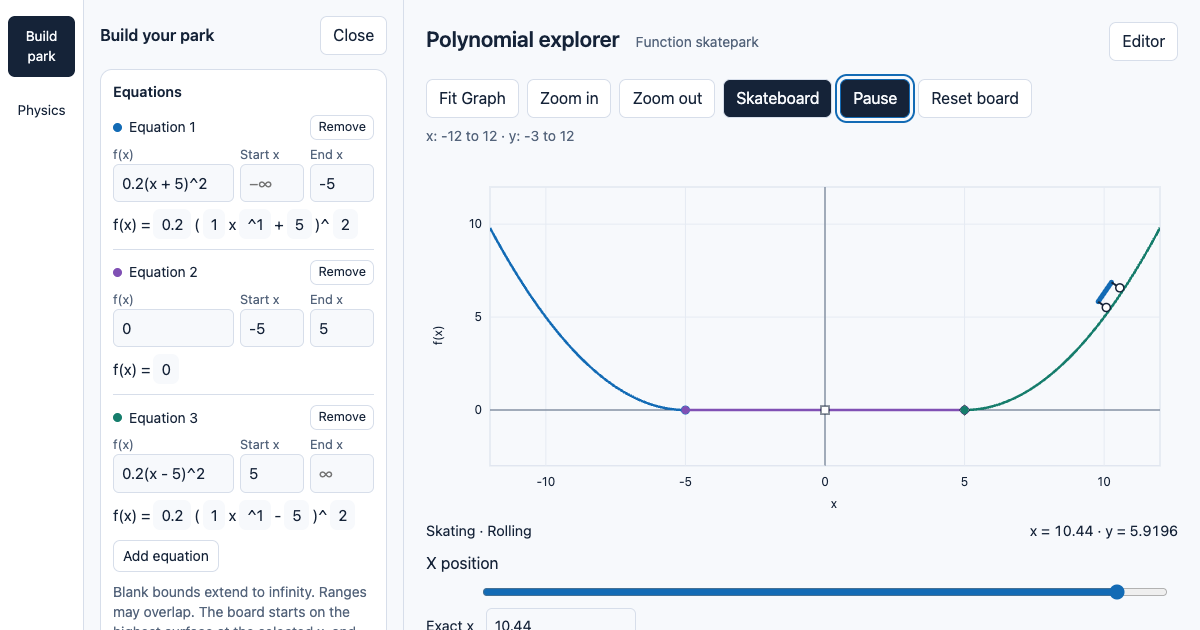
- In Build park, edit each equation and its start and end x values. Leave a bound blank for infinity; ranges can overlap or leave gaps.
- Pick a starting x position, then press Play.
- Ride with the keyboard or the on-screen buttons.
| Key | Action |
|---|---|
| Left / Right | Push |
| Down | Brake, or get ready to grind |
| Up | Ollie (double tap: kickflip) |
| Z / X / C / V | Kickflip / heelflip / 360 shuvit / varial flip |
| Up + Left or Right | Pop shuvit |
| 1–6 | 50-50, boardslide, noseslide, tailslide, nosegrind, 5-0 |
| Option / Escape / R | Play or pause / pause / reset the board |
On a touch screen, use the Push, Ollie, Kickflip and Brake buttons.
Your equations and settings are saved in your browser on this device.
Features
Equations are terrain
Write piecewise polynomials with their own start and end points. An equation slider lets you nudge any number and watch the park reshape.
Check your joins
Join diagnostics show where pieces meet smoothly, with matching values and slopes, and where a step will need an ollie.
Real skate physics
Gravity pulls along the curve, sharp bends launch you, and you can fall off an edge onto a lower track.
Tricks and grinds
Kickflips, heelflips, shuvits and varial flips, plus six grind poses from 50-50 to 5-0.
Tune everything
The Physics panel adjusts gravity, push power, ollie strength, friction, air steering and simulation speed, with one click to restore the defaults.